

Download FluidTunes – Gesture‑Based iTunes Controller for Mac
Overview
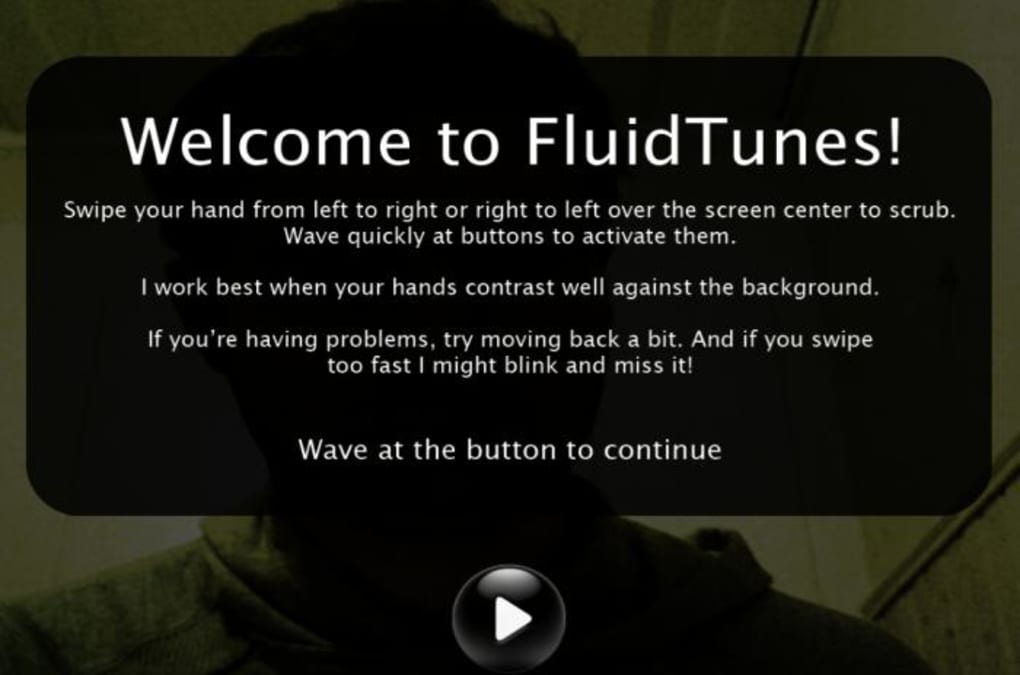
FluidTunes is a novel Mac‑only software application that lets you steer iTunes with the wave of a hand, a foot, or essentially any motion you can capture with your built‑in iSight camera. By translating visual gestures into playback commands, FluidTunes promises a “Minority Report” style interaction that feels futuristic and hands‑free. After a quick calibration routine, the app detects simple gestures—such as a left swipe to skip back, a right swipe to skip forward, or a vertical motion to adjust volume—allowing you to control playlists without touching the keyboard or mouse.
While the concept is undeniably exciting, the technology is still in a beta‑like state. Users often report erratic behavior, such as unintended scrolling, random song changes, or inverted directional responses. Nevertheless, FluidTunes stands out as one of the most original attempts to blend motion‑tracking with everyday media consumption on macOS.
If you’re curious about a free, secure, and experimental way to bring gesture control to iTunes, FluidTunes offers a compelling, albeit imperfect, taste of the future.
Key Features
- Gesture‑Based Playback: Play, pause, skip tracks, and navigate albums using hand or foot movements captured by iSight.
- Calibration Wizard: A quick, interactive setup that teaches the software your range of motion for more accurate detection.
- Customizable Sensitivity: Adjust the detection threshold to suit different lighting conditions or user preferences.
- Real‑Time Visual Feedback: On‑screen icons illuminate when gestures are recognized, giving immediate confirmation.
- Lightweight Footprint: The app runs quietly in the background without hogging CPU or memory, keeping your Mac fast.
- Free Download: FluidTunes is offered at no cost, encouraging experimentation without a financial barrier.
- Secure Installation: The installer is signed by the developer and does not require elevated permissions beyond standard macOS security prompts.
Installation & Usage Guide
Step‑by‑Step Download and Installation
1. Visit the official FluidTunes website and click the prominent Download Free button. The file is a signed .dmg package, ensuring a secure source.
2.
Once the download completes, double‑click the .dmg to mount the disk image.
3. Drag the FluidTunes icon into your /Applications folder. macOS will verify the app; if you see a warning about an unidentified developer, open System Preferences → Security & Privacy and allow the app to run.
4. Launch FluidTunes from the Applications folder.
The first run triggers a brief permission request to access the iSight camera—grant this permission to enable gesture detection.
Calibration and First Use
Upon launch, FluidTunes presents a calibration screen. Follow the on‑screen prompts: raise your hand (or foot) into the camera’s view, then perform a series of simple motions—wave left, wave right, raise up, lower down. Each successful motion lights a small icon, confirming that the software has learned your range of motion. Calibration typically takes under a minute.
Everyday Interaction
After calibration, the main interface minimizes to a discreet menu bar icon. While iTunes is active, simply perform the gestures you configured:
- Swipe left – Skip to the previous track.
- Swipe right – Advance to the next track.
- Vertical hand raise – Increase volume.
- Vertical hand lower – Decrease volume.
- Circular motion – Open the iTunes library view.
Troubleshooting Tips
• Ensure adequate lighting—iSight relies on contrast to differentiate gestures.
• Keep the camera unobstructed; a clear line of sight dramatically improves accuracy.
• If gestures feel reversed (left becomes right), revisit the calibration screen and toggle the “Invert Axis” option.
• For persistent erratic behavior, close and relaunch FluidTunes, then recalibrate. This often resets any drift in the motion‑tracking algorithm.
Compatibility & System Requirements
FluidTunes is built exclusively for macOS (formerly OS X) running on Intel‑based Macs that include an iSight or built‑in FaceTime HD camera. The minimum supported version is macOS 10.12 Sierra, though the developers recommend macOS 10.15 Catalina or later for the best performance and security updates. The app does not currently support Windows, Android, or iOS devices, as it relies on the native macOS camera APIs. Users with external USB webcams can also use FluidTunes, provided the camera is recognized by the system and offers at least 720p resolution. Memory consumption stays below 100 MB, and the CPU footprint averages 2–3 % during active gesture detection, making it suitable for older MacBook models.
Pros and Cons
Pros
- Innovative, hands‑free control adds a futuristic feel to iTunes.
- Free, with no hidden fees or subscription model.
- Lightweight and runs silently in the background.
- Secure, signed installer that respects macOS security protocols.
- Customizable sensitivity and calibration for various lighting conditions.
Cons
- Gesture recognition can be erratic, especially in low‑light environments.
- Lack of fine‑grained album scrolling; the app may jump between tracks unintentionally.
- Only compatible with macOS; no Windows, Android, or iOS version exists.
- Requires a functional iSight or external webcam—users without a camera cannot use the tool.
- Occasional false positives (e.g., random song changes) can be frustrating during playlists.
Frequently Asked Questions
Is FluidTunes really free?
Yes, FluidTunes is offered as a completely free download. There are no hidden charges, subscription fees, or in‑app purchases.
Which macOS versions does FluidTunes support?
The app runs on macOS 10.12 Sierra and newer, but for optimal performance and security updates, macOS 10.15 Catalina or later is recommended.
Can I use an external webcam instead of the built‑in iSight?
Yes, FluidTunes works with any USB webcam recognized by macOS, as long as the camera provides at least 720p resolution and proper focus.
Why does FluidTunes sometimes play the wrong song?
The gesture‑tracking algorithm can misinterpret rapid or ambiguous motions, especially in low‑light rooms. Re‑calibrating in a well‑lit area and adjusting sensitivity usually resolves this issue.
Is there a way to disable FluidTunes temporarily?
Yes, click the FluidTunes icon in the menu bar and select “Pause Detection.” This halts all gesture processing until you reactivate it.
Conclusion & Call to Action
FluidTunes delivers a glimpse of what media control could look like in a fully gestural world. While the technology isn’t flawless—occasional misfires and limited platform support can interrupt the flow—it remains a fun, free, and secure experiment for Mac users who love to try cutting‑edge tools. If you’re eager to download a hands‑free iTunes controller, give FluidTunes a try today.
The installation is simple, the learning curve is short, and the novelty factor is high. Keep an eye on future updates, as the developers have hinted at refined tracking algorithms and broader compatibility in upcoming releases. Embrace the future of music navigation—download FluidTunes now and start waving your way through playlists!
Download FluidTunes for free and experience gesture‑based iTunes control on your Mac.
Review Summary: FluidTunes is an innovative, free app that brings gesture control to iTunes on macOS. It shines in concept and ease of installation but suffers from inconsistent motion detection. Ideal for tech enthusiasts willing to experiment.
Pros
- Hands‑free operation adds novelty.
- Zero cost and secure download.
- Low system impact.
Cons
- Erratic gesture recognition.
- Limited to macOS.
- Calibration may need frequent tweaks.







